


Projects

Product designUI-UXUser ResearchUser Interviews
project image

AI assistants have gotten good at remembering us, and the best ones now let old details fade and update what's changed. But they still decide what matters on their own, out of sight.
A misread detail can quietly become a "fact" about you, sensitive moments are remembered all or not at all, and checking any of it means leaving the conversation for a settings page.
With a friend, mistakes surface early. They say something back, you correct it on the spot, and a passing comment doesn't quietly become part of who you are to them.
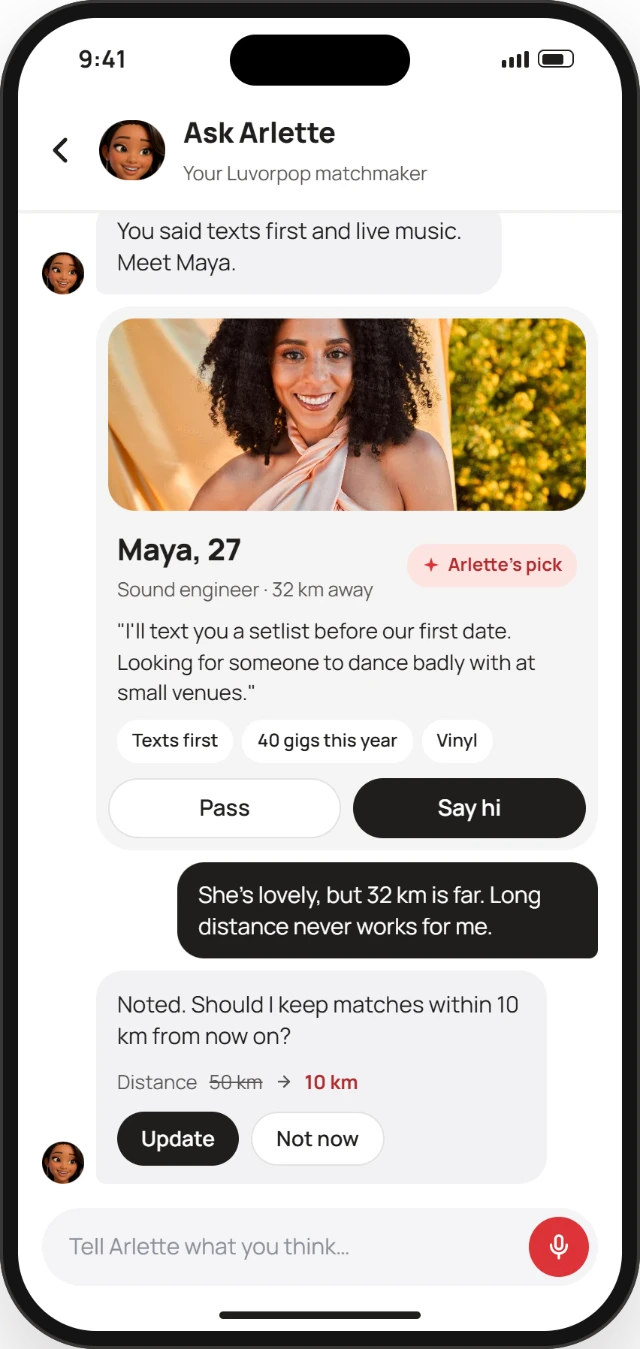
I'm designing memory that works like that. You see what it's holding on to, and one tap keeps it, fixes it or lets it go, right inside the chat. I'm exploring it through relationships, where the details are personal and keep changing.

With a friend, mistakes surface early. They say something back, you correct it on the spot, and a passing comment doesn’t quietly become part of who you are to them.

To see or fix what an AI remembers, you have to leave the conversation and dig through settings. Where in-chat checks exist, they’re limited: Sources may appear below the response, but whole past chats can only be rated or deleted, not corrected line by line. Most people never go looking, so mistakes quietly stick.

Sometimes the AI has a memory but doesn’t use it when it should. Even the memory list you can see isn’t complete: OpenAI notes that the summary will not include everything that ChatGPT remembers, so you can’t check what’s really there. And when it forgets, you can’t tell why. Was it never saved, not found, or skipped on purpose?

The AI decides on its own what’s worth remembering and how much it matters, without ever asking. A passing comment can be treated as permanent, while something you keep coming back to may never register as important. You have no say in what counts.

Today’s controls for sensitive topics are switches rather than judgment. Claude, for example, lets you opt in by toggling on “include sensitive topics in memory”, but there’s no way to say “remember this, but only bring it up if I do.” You’re left choosing between an AI that forgets what matters and one that might blurt out something painful.
{{ pd.tag }}
{{ pd.body }}{{ pd.hl }}{{ pd.post }}
Some memory problems live in the pipeline, and the RAG demo will show those through evals. The rest are interface problems, so I designed for them.
I explored a lot of ideas while studying how AI memory works, then narrowed them down to these four.
Most AI apps either use sensitive memories without asking or don't remember them at all. Here, when a message touches something sensitive, the AI asks "Use sensitive memories about Nick?" inside the input box while it's still thinking, before it writes anything. Yes gives a reply that draws on her history, and No gives an equally caring reply that leaves stored memories out. Saving follows the same rule: one quiet line under the reply opens a checklist where sensitive items start unticked.
Quick tangents clutter the main conversation and feed memory things it shouldn't keep. Select any text, or tap a word with the sticky-note tool, to ask up to three quick questions in a small window right there. A closed side chat leaves a faint sticky note on its word. You can add it to the main chat, or continue it in a new chat that shows where it branched from. Side chats save nothing to memory unless you add them to the main chat.
Today, fixing a wrong memory means digging through a settings list, far from the moment you noticed the mistake. Here you select the sentence that got it wrong and see exactly which memories it leaned on. You can then mark a memory outdated or not relevant, edit it, forget it, or ask the AI not to bring it up again. The fix shows up right in the reply: "6 months" is struck through with "4" beside it, and Nick becomes Nate.
Selecting text on a phone is fiddly, and it's the gesture every idea above depends on. Here a long-press picks a word, and each tap after that grows the selection: word, sentence, paragraph, then the paragraph above. Handles fine-tune the edges, and a small star on the selection opens the same window from the cards above. The first time, a tip card shows how it works. Tap anywhere outside and it all lets go.


The dating app that wasn't supposed to be a dating app